Apartment turns
Clean up new listing photos during turnover when you need usable images quickly and do not have time for a full shoot.
 Property Photo AI
Property Photo AI helps landlords, short-term rental hosts, and property managers make rental listing photos brighter, cleaner, and easier to scan while preserving the real space renters will see.
Last updated July 1, 2026.
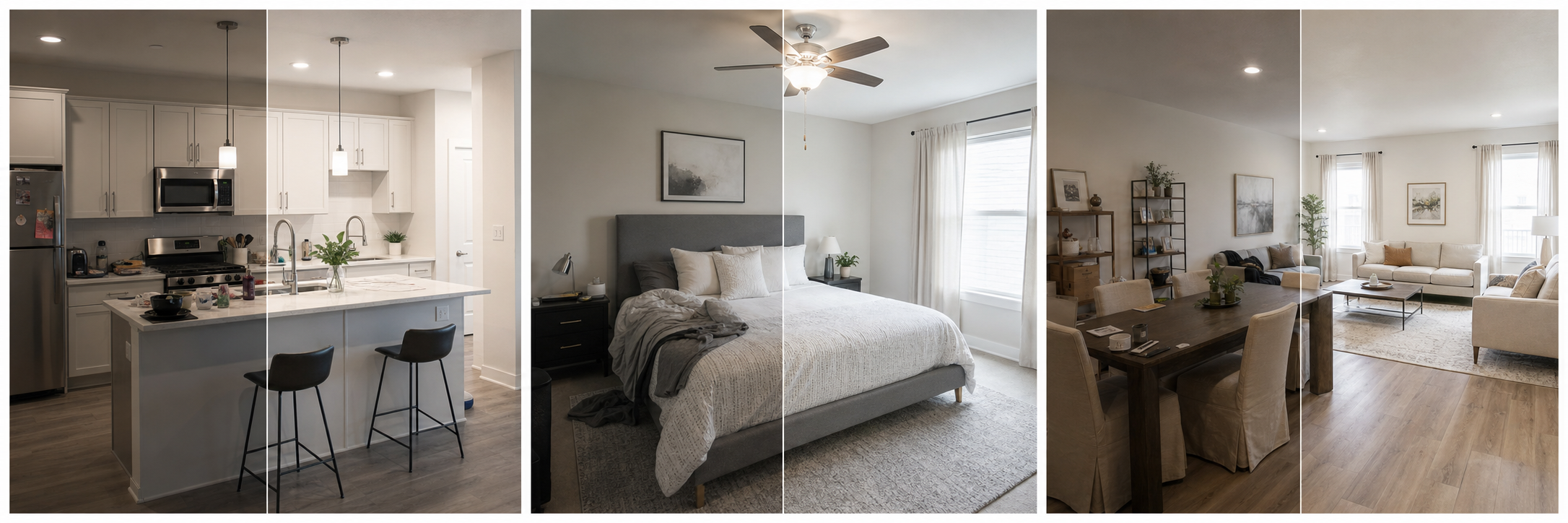
Renters shop differently than buyers. They scroll fast, compare a dozen listings in a sitting, and decide from thumbnails whether your unit earns a click. That makes consistency the priority: every photo in the gallery should have similar brightness, natural color, and clean framing, because one dark bathroom shot next to a bright living room reads as something being hidden. Rental photos also get reused across platforms with different display sizes, so a sharp, well-cropped image survives being shrunk into a search grid. Finally, rental turnover means photos are often taken in a hurry between tenants, with phone cameras and whatever light the day offered. A rental-specific editing pass fixes exactly those problems: dim rooms, yellow color casts from interior bulbs, crooked framing, and the stray mop bucket left in the corner, without exaggerating what the unit is.
Each platform has its own file rules, and it is worth checking them before you export, because a rejected or badly compressed photo undoes the editing work. Zillow Rental Manager accepts JPG, GIF, PNG, or TIF files and requires rental photo files to stay under 10 MB; it also lets you pick the primary photo, and its guidance notes that kitchen or living-room shots often work well in that slot. Craigslist adds images during the posting flow, and because its galleries are simpler, the first few photos carry most of the weight; you can edit the post later to update images. Short-term rental platforms ask for more resolution. The table below summarizes the platform guidance worth knowing, and our guide to Zillow and Craigslist listing photos covers the details.
| Platform | Formats and size | Notes from platform guidance |
|---|---|---|
| Zillow Rental Manager | JPG, GIF, PNG, or TIF; under 10 MB per file | Kitchen or living-room photos often work well as the primary photo |
| Craigslist | Added during the posting flow | Simple galleries; the first few photos matter most; posts can be edited later |
| Airbnb | Landscape, at least 1024x683 px; bigger is better | First five photos are especially important; at least one photo per room |
| Vrbo | JPEG/JPG, PNG, or GIF; min 1024x683 px; max 20 MB | Keep at least 6 photos published; no watermarks, text overlays, or black-and-white images |
| Booking.com | At least 2048x1080 px, preferably around 4000x3000 px | Suggests at least 10 photos |
The whole pass usually fits into the gap between finishing a turn and publishing the listing. Because uploads are free and one credit equals one finished photo, you can upload every frame from your walkthrough and only spend on the shots that make the final gallery. If a room came out unusable or you missed an angle, new-angle mode can generate an additional plausible listing-style view from real reference photos of the same unit, which beats reshooting when the unit is already occupied.
If you are deciding what to shoot and in what sequence, start with rental property photo order and the best lighting for rental property photos.
The safe framing is by edit type, not by tool. Routine corrections such as lighting, color correction, cropping, straightening, and sharpening do not change how the unit is represented and are generally treated as normal photo editing. Edits that add, remove, or change real features, like erasing damage, adding a fixture, or faking a view, should be disclosed and are usually a bad idea for rentals anyway, because the renter will stand in the real unit at the showing and any gap becomes a lost application or a resentful tenant. If you are a licensed agent listing rentals in California, note that AB 723 requires licensees to disclose digitally altered listing images and provide access to the original photo starting January 1, 2026, with routine corrections exempt. The full picture is in do you have to disclose AI-edited listing photos, and virtual staging disclosure rules by platform covers staged images specifically.
Clean up new listing photos during turnover when you need usable images quickly and do not have time for a full shoot.
Improve presentation across living rooms, kitchens, bedrooms, bathrooms, and exterior listing photos.
Buy credits only when you need finished results; uploads are free and one credit creates one output.
Useful edits include lighting correction, white balance, sharper crops, small cleanup, and consistent presentation across the listing gallery.
Yes. New-angle mode can create additional plausible listing-style views from real reference photos of the same property.
Zillow Rental Manager accepts JPG, GIF, PNG, or TIF files under 10 MB and lets you choose the primary photo. Craigslist galleries are simpler, so the first few photos you add during the posting flow matter most, and you can edit the post later to update images.
Zillow's guidance notes that kitchen or living-room photos often work well as the primary rental photo. Lead with the strongest, brightest room and keep the first few images focused on the spaces renters care about most.
Routine corrections like lighting, color, cropping, and sharpening are generally treated as normal editing. Edits that add, remove, or change real features of the unit should be disclosed and are usually a bad idea, since renters will see the real unit at the showing. California AB 723 applies disclosure rules to real estate licensees starting January 1, 2026.
Uploads are free and one credit equals one finished photo. Packs start at $4.99 for 3 results and $9.99 for 10, so a full rental gallery can be cleaned up without a subscription.