
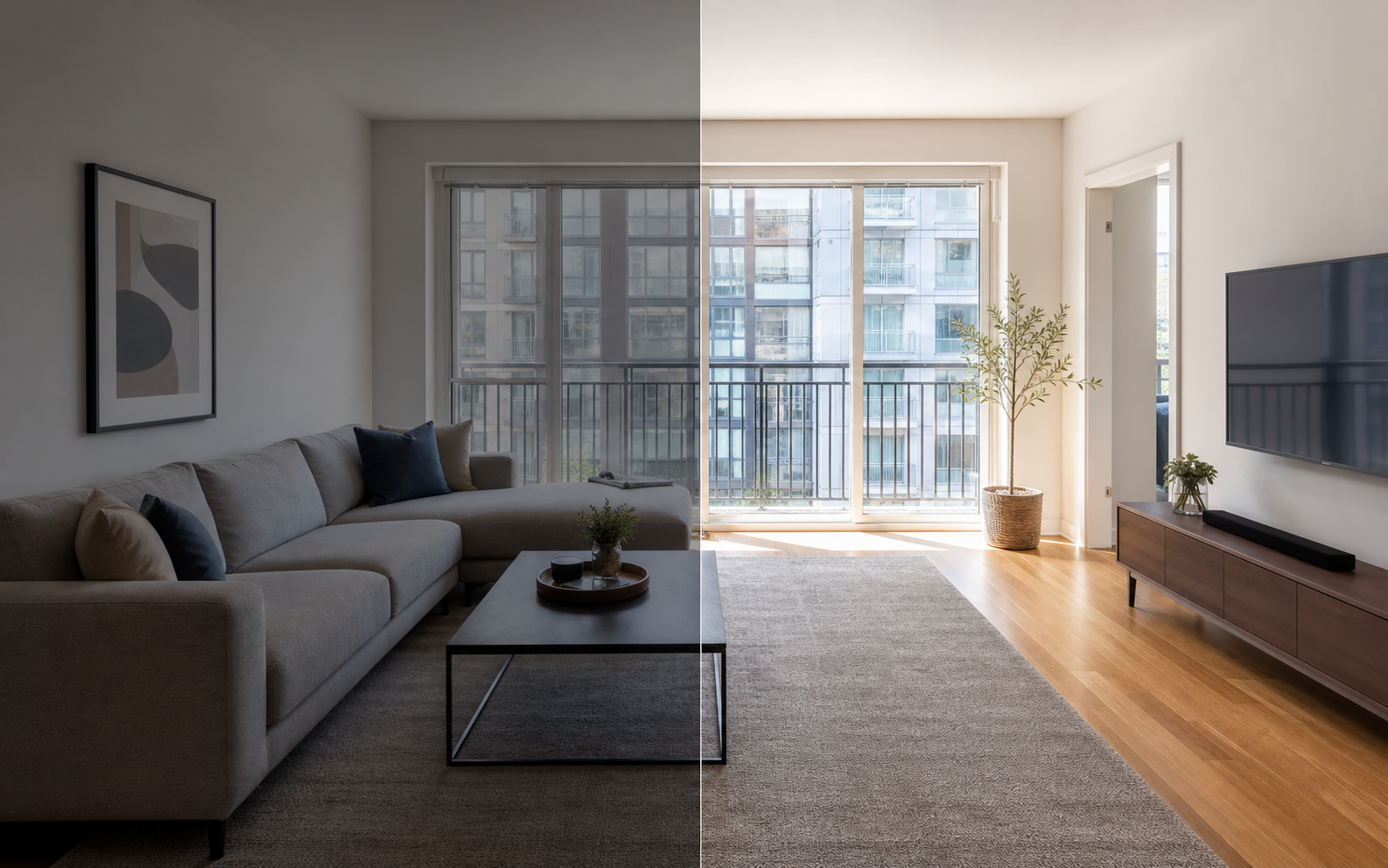
What is the best lighting for rental property photos?
The best lighting for rental photos is soft daylight, supported by neutral interior lights where needed. The goal is not maximum brightness; it is a room a renter or guest can actually read. Airbnb's host guidance recommends daylight and a clean, clutter-free space for exactly this reason: viewers are trying to judge size, condition, and layout, and even, natural light makes that easier.
In practice that means opening every blind and curtain, shooting when windows receive indirect light rather than direct sun, and turning on lamps only when they fill dark corners without adding a strong yellow cast. Avoid shooting straight into a blown-out window unless the view itself is the selling point. A slightly dim but accurate photo beats a bright one that hides how the room really feels.
When is the best time of day to shoot each room?
Shoot each room when its windows get soft, indirect light. That usually means following the sun around the property rather than photographing everything in one pass. East-facing rooms tend to look best mid-morning, west-facing rooms mid-afternoon, and north-facing rooms are flexible because their light stays even all day. Overcast days are underrated: clouds act like a giant diffuser and give you consistent, shadow-free light in every room at once. If you can only shoot at one time, pick mid-morning or mid-afternoon and accept that a couple of rooms will need more help from lamps and editing.
| Space | Best light | Tip |
|---|---|---|
| East-facing rooms | Mid-morning | Wait until direct sun is off the glass |
| West-facing rooms | Mid-afternoon | Avoid late glare on floors and counters |
| Bathrooms, hallways | Any time, lights on | Use neutral bulbs, wipe mirrors first |
| Exterior and entry | Early morning or late afternoon | Softer shadows, sky keeps detail |
| View or balcony | When the view is clear | Expose for the view, not the room |
How do you handle mixed lighting and color casts?
Mixed lighting is the most common reason rental photos look off. Daylight is blue-ish, older bulbs are warm orange, and some LEDs drift green, so a room lit by all three at once produces walls that shift color from corner to corner. The fix is to pick one dominant light source per room. If the room has good daylight, turn off very warm bulbs and let the windows carry the shot. If the room needs lamps, use bulbs of the same color temperature throughout and keep daylight from competing where you can. When a cast still sneaks through, correct white balance in editing until whites look white and wood tones look believable. Consistent color across the whole gallery matters more than perfection in any single frame.
How do you photograph dark rooms honestly?
Dark rooms like bathrooms, basements, and interior bedrooms should be photographed with lights on and exposed so details are visible, then left looking like what they are. That is fine; nobody expects a windowless bathroom to glow. What breaks trust is editing a genuinely dim room into something that reads as bright and airy, because the mismatch is obvious the moment someone walks in. Brighten enough that a viewer can inspect fixtures, flooring, and condition. Keep shadows where shadows naturally live. If a room's darkness is a real drawback, the photo should let people factor that in rather than discover it at check-in or on a tour. Honest photos of weak rooms protect your reviews and reduce wasted showings.
What is a simple lighting workflow for shoot day?
The simplest workflow is: scout the light, standardize the bulbs, open everything, then shoot each room during its best window. You do not need equipment to light a rental well; you need a repeatable routine that takes advantage of the light the property already has. The scouting step matters most and is the one people skip. Ten minutes of walking the property the day before, noting when each room looks its best, turns shoot day from guesswork into a schedule. Standardizing bulbs is the second-highest-value step, because one mismatched warm bulb can tint an entire room and cost you editing time later. Everything after that is mechanical, which is exactly what you want when photographing a property you will list once and live with for months.
- Walk the property the day before and note when each room gets its best indirect light.
- Replace any dead or mismatched bulbs with neutral ones of the same color temperature.
- Open every blind and curtain fully, and clean the windows you will shoot near.
- Shoot rooms in order of their light window, not in walking order.
- In each room, turn lamps on or off and pick whichever version looks cleaner.
- Expose for the room, keeping some window detail where possible.
- Take each shot twice, once slightly brighter, so you can choose later.
Can editing fix bad lighting after the shoot?
Editing can fix a lot: underexposure, dull contrast, mixed color casts, and inconsistent brightness across a gallery are all routine corrections. What editing cannot honestly fix is a room that was photographed with no useful light at all, and it should never be used to make a space look structurally brighter than it is. Property Photo AI is built for the legitimate side of this: it normalizes lighting and color across a set of photos while preserving the real layout, fixtures, windows, and views, so the gallery looks consistent without becoming fiction. Uploads are free and one credit produces one finished photo.
Routine lighting and color corrections are broadly considered normal practice, and even California's new disclosure law exempts them; see when edited listing photos require disclosure. For the shooting fundamentals behind good light, start with how to take the best photos of your place.
FAQ
What lighting is best for rental photos?
Soft, indirect daylight is best for most rooms. Open blinds and curtains, turn on interior lights when they add useful fill, and avoid harsh midday glare and strongly colored bulbs. Airbnb's host guidance also recommends shooting with daylight because it keeps rooms looking natural and readable.
Can AI fix dark listing photos?
AI can recover exposure, balance color, and lift shadows, and tools like Property Photo AI do this while preserving the real layout and fixtures. But a reasonably lit original always produces a better, more truthful result than rescuing a very dark frame.
Should I use flash for rental property photos?
Usually no. On-camera flash creates flat light, harsh shadows, and reflections in windows and mirrors. Daylight plus existing lamps looks more natural. If a room is genuinely dark, brighten it moderately in editing rather than blasting it with direct flash.
What time of day should I photograph a rental?
Mid-morning or mid-afternoon usually gives soft, even daylight without harsh glare. Shoot rooms when their windows get indirect light rather than direct sun. Exterior shots often look best in early morning or late afternoon when shadows are softer.
Is it misleading to brighten listing photos?
No. Routine exposure and white-balance corrections are normal photography, not misrepresentation. The line is changing what the room actually contains or how it is represented. A brightened photo of a real dim room is fine; editing it to look like a sun-filled space is not.
How Property Photo AI helps
Property Photo AI helps landlords, Airbnb hosts, property managers, and real estate teams turn existing room photos into cleaner listing-ready images. It is built for realistic touch-ups: better light, color, crop, sharpness, and small-distraction cleanup without changing the actual room layout, fixtures, view, or condition.
Sources
- Airbnb Help Center: Taking great photos of your listing
- Airbnb Help Center: Setting up a photo tour for your home listing
- Airbnb Help Center: Add visual descriptions to photos in your listing
- Airbnb Help Center: Confirming photo accuracy for listings
- Airbnb Help Center: Offer for free Airbnb photography
- Google Business Profile
- Google Business Profile Help: Manage your hotel's details
- Booking.com Partner Hub: Understanding photo requirements for your property
- Booking.com Partner Hub: Improve visibility and ranking
- Vrbo Help: Photo guidelines
- Zillow Rental Manager Help: Photo Uploading Tips
- Zillow Rental Manager: Post a listing
- Zillow Rental Manager Help: Why is my primary photo different?
- Craigslist Help: Creating a posting
- Craigslist Help: Images
- Airbnb Help Center: Pricing your home listing
- Airbnb Help Center: Compare similar listings
- Airbnb Help Center: How search results work