Lighting and color
Correct dim interiors, color casts, white balance, and uneven exposure so the room reads cleanly in an MLS gallery.
 Property Photo AI
Property Photo AI helps real estate teams, agents, landlords, and property managers turn dark or uneven property photos into cleaner listing images without making the room look larger or materially different.
Last updated July 1, 2026.
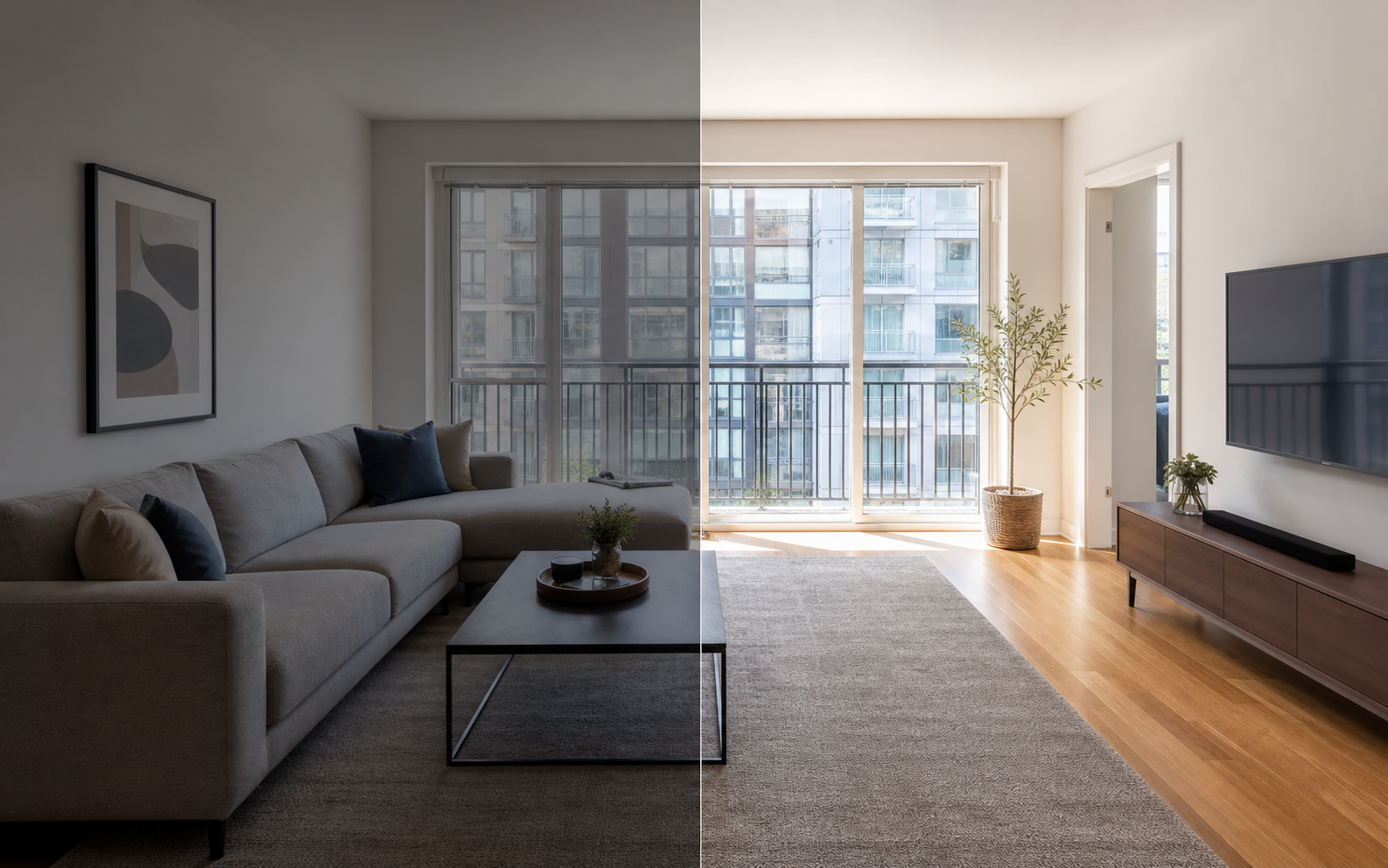
A good AI real estate photo editor changes how a listing photo reads, not what the property is. In practice that means correcting exposure so dark rooms are easier to evaluate, fixing color casts from mixed lighting, straightening and cropping frames so the gallery looks consistent, sharpening soft images, and cleaning up small distractions like a stray cable or a cluttered countertop. What it should never change is anything a buyer would rely on: room dimensions, wall and window placement, doors, floor plans, permanent fixtures, or the view out the window. Property Photo AI's touch-up mode is constrained to preserve the real layout, fixtures, and views, so the edited photo still shows the same house a buyer will walk through at the showing. That distinction is what separates presentation from misrepresentation.
Correct dim interiors, color casts, white balance, and uneven exposure so the room reads cleanly in an MLS gallery.
Produce listing-ready framing and a sharper-looking result while keeping the original room structure intact.
Reduce minor visual distractions that pull attention away from the property, while avoiding misleading edits to permanent features.
The dividing line is whether the edit changes how the property is represented. Routine corrections such as lighting, color correction, cropping, straightening, and sharpening make the photo a more accurate record of the real space and are widely treated as normal listing practice. Edits that add, remove, or change real features of the property are a different category: they can require disclosure and, more practically, they set buyer expectations the property cannot meet at the showing. Agents who keep their edits in the first column rarely have a problem; edits in the second column deserve real hesitation even where they are technically permitted with disclosure. Our disclosure-safe enhancement checklist walks through this photo by photo.
| Edit type | Generally routine | Needs disclosure or should be avoided |
|---|---|---|
| Lighting and exposure | Brightening a dim room, evening out exposure | Faking a bright view a room never gets |
| Color | White balance, removing color casts | Recoloring walls, floors, or finishes |
| Framing | Cropping, straightening verticals | Distorting perspective to enlarge a room |
| Cleanup | Removing a cable or a bin left in frame | Removing power lines, stains, cracks, or damage |
| Contents | Nothing added | Virtual staging or added fixtures without labeling |
The workflow is short enough to run between the shoot and the listing going live. Uploads are free, and one credit produces one finished photo, so you can upload the whole shoot, work through it, and only spend credits on frames you plan to publish. Property Photo AI accepts JPG, PNG, and HEIC files up to 50MB, which covers phone photos as well as camera exports. Most agents use touch-up mode for the main gallery and reserve new-angle mode for rooms where the shoot came back thin, since new-angle results are generated from real reference photos of the same property.
Before you publish, it is worth checking dimensions too; see our guide to listing photo size requirements and when twilight listing photos are worth shooting for the cover image.
It depends on the edit and where you practice. Starting January 1, 2026, California's AB 723 requires real estate licensees to disclose digitally altered listing images and provide access to the original, unaltered photo; routine edits like lighting, color correction, cropping, straightening, and sharpening that do not change how the property is represented are exempt. Even outside California, NAR's Code of Ethics sets a similar bar: Article 12 requires REALTORS to present a "true picture" in advertising and marketing, and Article 2 prohibits exaggerating, concealing, or misrepresenting pertinent facts about a property. The practical rule for agents is simple: keep edits in the routine-correction category and keep your originals. For the full breakdown, read do you have to disclose AI-edited listing photos and our comparison of AI photo editing vs misrepresentation.
The best real estate photo edits improve clarity without changing material facts. Property Photo AI prompts the model to avoid changing room size, wall and window placement, doors, permanent fixtures, floor plans, exterior views, and other details a buyer or renter would rely on.
It is software that uses AI to improve listing photos through lighting, color, crop, sharpness, and cleanup edits. Property Photo AI focuses on realistic output for MLS listings, homes, apartments, and rentals, preserving the real property in every edit.
No. Listing images should not misrepresent the property. Property Photo AI is built around honest touch-ups rather than fake room size, layout changes, or invented permanent features.
Most MLSs accept routinely corrected photos, but each MLS sets its own photo rules, so check yours before publishing. NAR's Code of Ethics Article 12 requires REALTORS to present a true picture in advertising, which is a sensible standard to apply to any edit regardless of local rules.
Starting January 1, 2026, California AB 723 requires real estate licensees to disclose digitally altered listing images and provide access to the original photo. Routine edits like lighting, color correction, cropping, straightening, and sharpening that do not change how the property is represented are exempt.
Property Photo AI supports JPG, PNG, and HEIC files up to 50MB, which covers most phone and camera output used for listing photography.
Uploads are free, and one credit produces one finished photo. Credit packs start at $4.99 for 3 results and $9.99 for 10, so you only pay for the images you actually keep and publish.