
What are the photo size requirements by platform?
Every major platform accepts a bigger photo than it displays, so the practical rule is to upload the largest clean image the platform allows. The verified specs as published in each platform's help content:
| Platform | Minimum / recommended size | Formats and limits |
|---|---|---|
| Airbnb | At least 1024x683; bigger is better; landscape displays in search | Standard image formats; first five photos are featured on the listing |
| Vrbo | Minimum 1024x683; recommends 3840x2160 or higher; landscape | JPEG/JPG, PNG, GIF; max 20 MB; at least 6 photos; no watermarks, text overlays, or black-and-white |
| Booking.com | At least 2048x1080; prefers around 4000x3000 | Suggests at least 10 photos |
| Zillow Rental Manager | Larger uploads recommended; primary photo is chooseable | JPG, GIF, PNG, TIF; files under 10 MB |
| Craigslist | No published minimum; first image becomes the thumbnail | Images added in the posting flow; can be updated by editing the post |
Specs change, so when a listing platform rejects an upload, check its current help page; the sources below link to each one.
Why does uploading larger photos matter?
Platforms resize every upload into multiple display sizes: search thumbnails, gallery views, and full-screen images on phones, laptops, and increasingly TVs. When you upload a small or heavily compressed file, the platform has nothing good to work from, and the result is soft edges, smeared textures, and visible compression blocks exactly where viewers zoom in. When you upload a large, clean file, every derived size is downsampled from real detail and stays crisp.
Resolution is also insurance. A 4000-pixel-wide original can be cropped to fix composition, straightened to fix a tilted horizon, or reused for print flyers without falling below platform minimums. A 1024-pixel image has no such margin: one meaningful crop and it is below Airbnb's floor. Storage is cheap and uploads are one-time; there is no good reason to publish the small version of a photo you own in full size.
What export settings work across every platform?
- Shoot at your camera's or phone's full resolution, in landscape orientation.
- Edit first, then export once: exposure, white balance, straightening, crop.
- Export JPG at high quality (roughly 80 to 90 percent) in the sRGB color space.
- Keep the long edge at 3840 pixels or higher, staying under each platform's file cap: 20 MB for Vrbo, 10 MB for Zillow rentals.
- Name files by room, such as 03-kitchen.jpg, so gallery ordering stays manageable.
- Upload originals, not screenshots or images forwarded through messaging apps, which recompress aggressively.
One export usually serves every platform. The only per-platform work left is ordering the gallery and writing captions.
What ruins photo quality after upload?
The most common culprits are upstream of the platform. Screenshots capture screen pixels instead of the file, cutting resolution dramatically. Messaging and email apps recompress images unless you send them as documents or originals. Repeated edit-save-edit cycles in JPG stack compression artifacts. Extreme HDR and oversharpening create halos that platform recompression makes worse. And portrait orientation, while not a quality problem, wastes most of the landscape display slot on Airbnb and Vrbo and gets cropped unpredictably.
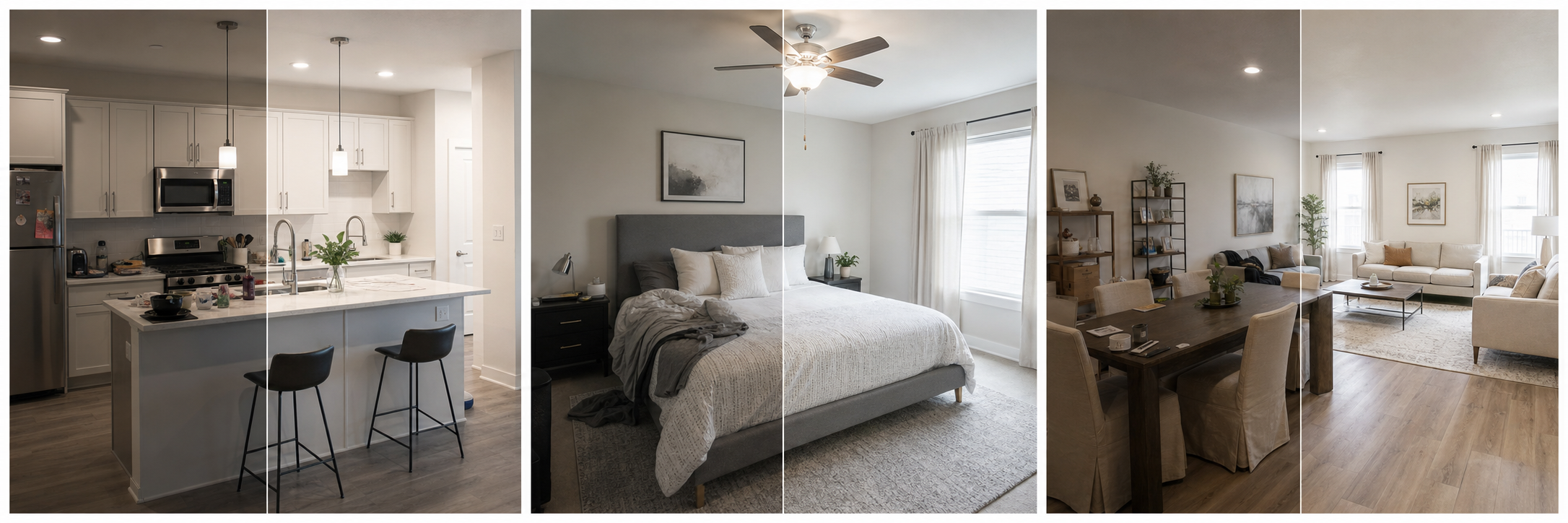
A quality-preserving pipeline is short: camera file, one editing pass, one high-quality export, direct upload. Property Photo AI fits that pipeline; it accepts JPG, PNG, and HEIC up to 50MB, and its touch-up mode returns a clean, listing-ready image with corrected lighting, color, crop, and sharpness while preserving the real room, so you are not stacking a second lossy edit on top of your export.
Do photo minimum counts matter as much as sizes?
Minimum counts are floors, not targets. Vrbo requires at least 6 published photos and Booking.com suggests at least 10, but a gallery hits its real goal when every room, every bathroom, and every booking-relevant amenity has at least one clear photo, which for most whole homes means 20 or more images. Airbnb's photo-tour structure makes this explicit: each room or space needs at least one photo to appear in the tour, and the first five photos carry the featured spots.
Coverage and sequencing are their own craft: see how many photos an Airbnb listing needs and how to order rental property photos.
FAQ
What size should listing photos be?
Shoot large and landscape. A safe universal export is a high-quality JPG around 3840x2160 or your camera's native resolution, which exceeds Airbnb's 1024x683 minimum, Vrbo's recommendation of 3840x2160 or higher, and Booking.com's preference for roughly 4000x3000 images.
What file formats do listing platforms accept?
JPG works everywhere. Vrbo accepts JPEG/JPG, PNG, and GIF; Zillow Rental Manager accepts JPG, GIF, PNG, and TIF. When in doubt, export high-quality JPG in the sRGB color space for predictable color across platforms.
Why do my photos look blurry after uploading?
Usually because the upload was smaller than the display size or was heavily compressed, forcing the platform to upscale or recompress it. Upload the largest clean file within each platform's limit and avoid screenshots, messaging-app copies, and repeated re-saves.
Do platforms allow watermarks or text on photos?
Vrbo explicitly rejects photos with watermarks, text overlays, or QR codes, and black-and-white images. Other platforms discourage promotional text. Keep marketing text off listing photos; use captions for information, including any required disclosure wording where alterations were made.
How many photos should I upload?
Vrbo requires at least 6 published photos and Booking.com suggests at least 10, but completeness matters more than a number: every room and booking-relevant amenity should be covered. Airbnb's photo tour works best with at least one photo per room or space.
How Property Photo AI helps
Property Photo AI helps landlords, Airbnb hosts, property managers, and real estate teams turn existing room photos into cleaner listing-ready images. It is built for realistic touch-ups: better light, color, crop, sharpness, and small-distraction cleanup without changing the actual room layout, fixtures, view, or condition.