
Do Airbnb photo descriptions actually matter?
Yes, for three separate reasons. First, they make your listing usable for guests who rely on screen readers or who browse on connections too slow to load images; Airbnb's own guidance calls out both groups. Second, they give search engines objective context about what each image shows, which helps your listing content be interpreted correctly. Third, and least obvious, writing them forces you to state plainly what each photo communicates, which is the fastest audit of your gallery you can run. If you cannot describe a photo in a useful sentence, the photo probably is not doing a job, and if you find yourself describing the same thing three times, you have duplicates. Descriptions are a small task with an outsized return: better accessibility, clearer search context, and a tighter gallery.
Who benefits when you write visual descriptions?
Three audiences, per Airbnb's guidance. Guests who are blind or have low vision hear the description through a screen reader, so it is their only access to the photo's content. Guests on slow or metered connections may see descriptions before, or instead of, the images themselves. And search engines use the text to understand what the image depicts, since they cannot reliably judge a photo on pixels alone. There is a fourth beneficiary: you. Hosts who describe every photo tend to notice missing rooms, redundant angles, and images that do not prove anything. Airbnb's photo-tour guidance says each room or space should have at least one photo, and a description pass is the easiest way to confirm your tour actually covers the property room by room.
What makes a photo description good?
A good description is objective, specific, and front-loaded: it names the space, then the details a guest would weigh, in order of importance. It reads like an inventory a stranger could verify from the photo, not like ad copy. Compare the difference below; the strong versions tell a screen reader user something they can act on.
| Photo | Weak description | Strong description |
|---|---|---|
| Bedroom | Cozy, dreamy bedroom retreat | Queen bed with white bedding, two nightstands, blackout curtains, closet on the left |
| Bathroom | Spa-like bathroom | Step-free walk-in shower, single vanity, towels provided |
| Kitchen | Chef's kitchen | Full kitchen with gas stove, oven, dishwasher, and coffee maker on the counter |
| Workspace | Perfect for remote work | Desk by the window with office chair, lamp, and two outlets |
How do you write descriptions for a whole gallery efficiently?
Work through the gallery once, in photo-tour order, with a simple formula: space, main objects, decision-relevant details. Most photos take under a minute once you stop reaching for adjectives.
- Open your photo tour and list every image in order.
- For each photo, name the room or space first.
- Add the two or three largest objects a viewer would notice.
- Add any detail that affects a booking decision, such as bed size or step-free access.
- Cut subjective words: perfect, stunning, luxurious, best.
- Read each description without the photo and check that it stands alone.
- Flag any photo you could not describe usefully; replace or delete it.
What should you avoid in photo descriptions?
Avoid keyword stuffing, mood language, and claims the photo does not prove. Airbnb recommends objective descriptions, and the reasons are practical: a screen reader user gains nothing from stunning sunset vibes, a search engine can be misled by text that does not match the image, and any gap between description and reality erodes the accuracy standard Airbnb expects from listings. Also avoid describing edits as features; if a photo has been brightened or color-corrected, the description should still match what a guest will see in person. Do not repeat the listing title in every description, and do not describe amenities that are visible in the photo but not actually provided, such as a decorative fireplace that does not work. Short, factual, and verifiable beats clever every time.
How do descriptions improve the gallery itself?
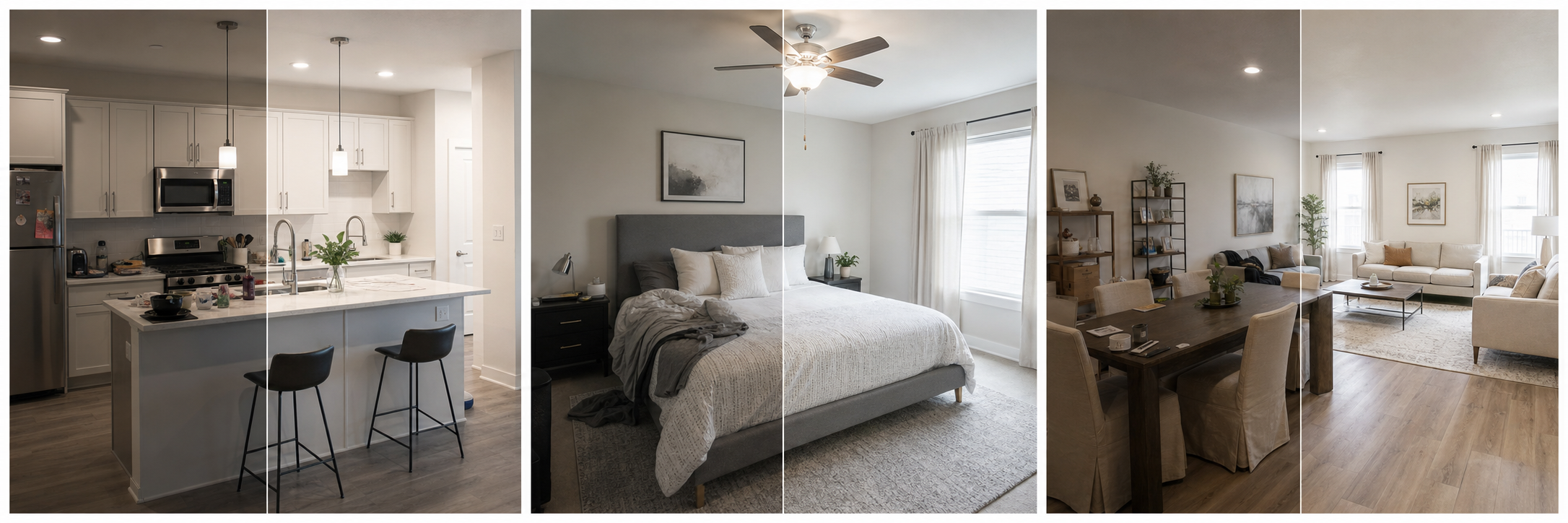
Treat the description pass as a gallery audit. Every photo should earn a factual sentence; photos that cannot are usually dark, redundant, or pointless, and they are candidates for reshooting or removal. When a description reveals a weak but necessary photo, say a dim bathroom that is your only bathroom shot, fix the image rather than the words: a routine cleanup in Property Photo AI can correct the lighting, color, and crop so the photo finally matches its honest description. The description and the pixels should tell the same story.
Once your descriptions are written, check them against the Airbnb photo checklist and make sure your photo tour order puts the most decision-relevant images first.
FAQ
Do Airbnb photo descriptions help accessibility?
Yes. Airbnb's guidance says visual descriptions help guests who are blind or have low vision and use screen readers, and guests on slow connections who cannot load images. A clear description lets those guests evaluate the room the photo shows.
Should photo descriptions be promotional?
No. Airbnb recommends objective descriptions rather than marketing language. Describe what is actually visible, with the most important details first: the room, the main furniture, notable amenities, and layout clues. Words like stunning or luxurious add nothing a screen reader user can verify.
Do photo descriptions affect search visibility?
Airbnb notes that visual descriptions give search engines context about what an image shows. That is not a ranking trick, but accurate image context can help your listing content be understood correctly, which is a reasonable side benefit of writing them well.
How long should an Airbnb photo description be?
One or two factual sentences is usually enough. Name the space, the key objects, and any feature that matters to a booking decision, such as a step-free shower or blackout curtains. Long paragraphs slow screen reader users down without adding useful information.
Should every photo get a description?
Ideally yes, and certainly every photo that carries decision weight: bedrooms, bathrooms, kitchen, workspace, and amenities. If you are short on time, describe the first five photos and each room's primary photo first, then fill in the rest.
How Property Photo AI helps
Property Photo AI helps landlords, Airbnb hosts, property managers, and real estate teams turn existing room photos into cleaner listing-ready images. It is built for realistic touch-ups: better light, color, crop, sharpness, and small-distraction cleanup without changing the actual room layout, fixtures, view, or condition.
Sources
- Airbnb Help Center: Taking great photos of your listing
- Airbnb Help Center: Setting up a photo tour for your home listing
- Airbnb Help Center: Add visual descriptions to photos in your listing
- Airbnb Help Center: Confirming photo accuracy for listings
- Airbnb Help Center: Offer for free Airbnb photography
- Google Business Profile
- Google Business Profile Help: Manage your hotel's details
- Booking.com Partner Hub: Understanding photo requirements for your property
- Booking.com Partner Hub: Improve visibility and ranking
- Vrbo Help: Photo guidelines
- Zillow Rental Manager Help: Photo Uploading Tips
- Zillow Rental Manager: Post a listing
- Zillow Rental Manager Help: Why is my primary photo different?
- Craigslist Help: Creating a posting
- Craigslist Help: Images
- Airbnb Help Center: Pricing your home listing
- Airbnb Help Center: Compare similar listings
- Airbnb Help Center: How search results work