
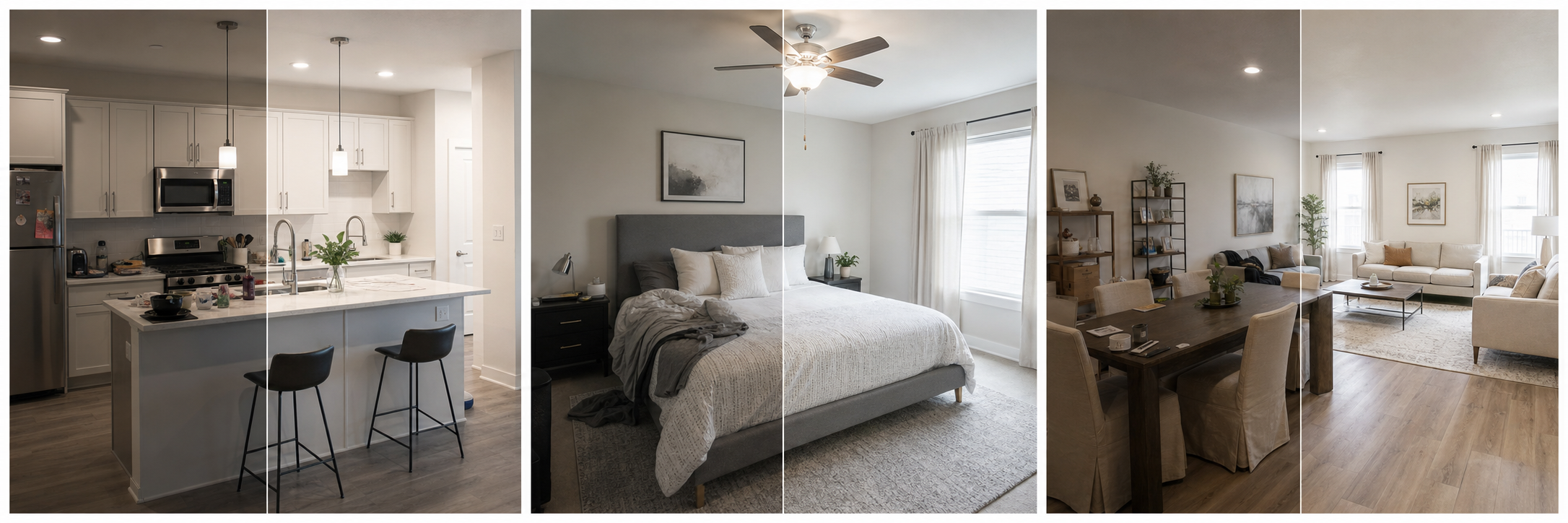
Why does the cover photo get the first click?
The cover photo wins or loses attention before your title, price, reviews, or amenities get a fair read. In search results, guests scan a wall of thumbnails and open only a handful of listings, so the cover image is effectively your entire first impression compressed into one small rectangle. If it is dim, cramped, vertical, or confusing, most guests will never discover that the rest of your listing is excellent. That makes the cover photo the highest-leverage image you own: every improvement to it touches every guest who sees you in search, while an improvement to photo twelve only reaches the guests who were already fairly interested. Hosts who treat the cover as a deliberate choice, tested at thumbnail size, consistently present better than hosts who let the platform default stand.
What does Airbnb say about the first photo?
Airbnb's photo-tour guidance says the first photo is the large image that appears in search, and that the first five photos are especially important because they are prominent on the listing. Its host guidance also recommends landscape photos of at least 1024x683 pixels, bigger where possible, with a clean, clutter-free space and daylight. Read together, that is a clear instruction: the cover is the top of your funnel and should not be selected casually. It also means the cover does not work alone. The four photos behind it are the immediate follow-up a curious guest sees, so a strong cover backed by a weak second and third image still leaks bookings. Choose the cover first, then build the next four photos to support the story it starts.
What should your cover photo communicate?
The cover should answer one question: why should a guest click this listing instead of the next one? The honest answer differs by property. For a city apartment it is often the bright main living space; for a cabin it might be the setting; for a beach condo, the view. Whatever the answer, the feature must be large enough to read at thumbnail size and must still be true when the guest arrives. A technically beautiful photo of your least representative corner sets up disappointment; an honest photo of your best real feature sets up a good review.
| Listing type | Strong cover candidate | Why it works small |
|---|---|---|
| City apartment | Bright main living area | Signals space and light instantly |
| Cabin or rural stay | Exterior in its setting | Sells the reason for the trip |
| Beach or view property | Balcony or window view | The differentiator is the view |
| Budget or business stay | Clean bedroom with workspace | Matches what the guest is buying |
What are the most common cover photo mistakes?
The most common failures are all readability failures at small size. Vertical photos get cropped awkwardly because search results display in landscape. Dark or muddy images look worse as thumbnails than at full size. Extreme wide-angle shots make rooms look distorted and faintly dishonest. Over-filtered color reads as untrustworthy, and collages or text overlays turn into noise when shrunk. The subtler mistake is choosing a photo where the selling point is too small to see: a distant hot tub, a tiny slice of ocean, a great kitchen at the far end of a frame. At search-result size, one clear subject beats three competing ones. Simplicity, brightness, and a single obvious reason to click will outperform a cleverer but busier image almost every time.
How do you choose a cover photo, step by step?
Treat the choice like a small experiment instead of a gut call. The goal is to find the image that stays clear when small, shows a meaningful and honest feature, and sets the expectation you want the rest of the gallery to confirm. A repeatable process takes about fifteen minutes.
- List the two or three real reasons guests choose your place over neighbors.
- Pick three candidate photos that show those reasons clearly.
- Shrink each candidate to thumbnail size on your phone and judge readability.
- Eliminate any image that is vertical, dark, distorted, or no longer accurate.
- Choose the survivor that best matches your ideal guest's priority.
- Arrange the next four photos to cover sleeping, bathing, cooking, and your differentiator.
- Recheck the search-result appearance after publishing and revisit if clicks stay flat.
How should you edit a cover photo without overdoing it?
Edit the cover harder than any other photo, but only within honest limits. Correct exposure so the room reads bright at thumbnail size, fix white balance so whites look white, straighten verticals, crop out dead space, and remove small distractions like a stray cable or bin. Property Photo AI is built for exactly this kind of realistic touch-up: it improves lighting, color, crop, and sharpness while preserving the real layout, fixtures, and views, so the photo stays a fair promise. What you should not do is stretch the room, saturate a view beyond reality, or clean up permanent flaws the guest will meet at check-in. The cover creates the expectation; the stay has to cash it.
Once the cover is set, make sure the rest of the gallery supports it: see how to order your Airbnb photos and how better photos improve booking rate.
FAQ
What makes a good Airbnb cover photo?
A good cover photo is landscape-oriented, bright, uncluttered, and focused on the single most compelling part of the stay. It should stay readable at thumbnail size, because that is how most guests first see it in search results.
Should the cover photo show the exterior or interior?
Use whichever image best explains the value of the stay. For many listings that is the main living area; for others it is a view, pool, standout bedroom, or charming exterior. Choose the feature guests are most likely to book you for.
Can I use a vertical photo as my Airbnb cover?
Avoid it. Airbnb displays search-result photos in landscape and recommends landscape images of at least 1024x683 pixels, so a vertical shot gets cropped or wastes space exactly where the listing needs to look its best.
How often should hosts change the cover photo?
Revisit it whenever bookings slow, the space changes, or the season shifts. Testing two or three strong candidates over time is reasonable, as long as each one is current, accurate, and shows something guests will actually find on arrival.
How Property Photo AI helps
Property Photo AI helps landlords, Airbnb hosts, property managers, and real estate teams turn existing room photos into cleaner listing-ready images. It is built for realistic touch-ups: better light, color, crop, sharpness, and small-distraction cleanup without changing the actual room layout, fixtures, view, or condition.
Sources
- Airbnb Help Center: Taking great photos of your listing
- Airbnb Help Center: Setting up a photo tour for your home listing
- Airbnb Help Center: Add visual descriptions to photos in your listing
- Airbnb Help Center: Confirming photo accuracy for listings
- Airbnb Help Center: Offer for free Airbnb photography
- Google Business Profile
- Google Business Profile Help: Manage your hotel's details
- Booking.com Partner Hub: Understanding photo requirements for your property
- Booking.com Partner Hub: Improve visibility and ranking
- Vrbo Help: Photo guidelines
- Zillow Rental Manager Help: Photo Uploading Tips
- Zillow Rental Manager: Post a listing
- Zillow Rental Manager Help: Why is my primary photo different?
- Craigslist Help: Creating a posting
- Craigslist Help: Images
- Airbnb Help Center: Pricing your home listing
- Airbnb Help Center: Compare similar listings
- Airbnb Help Center: How search results work