
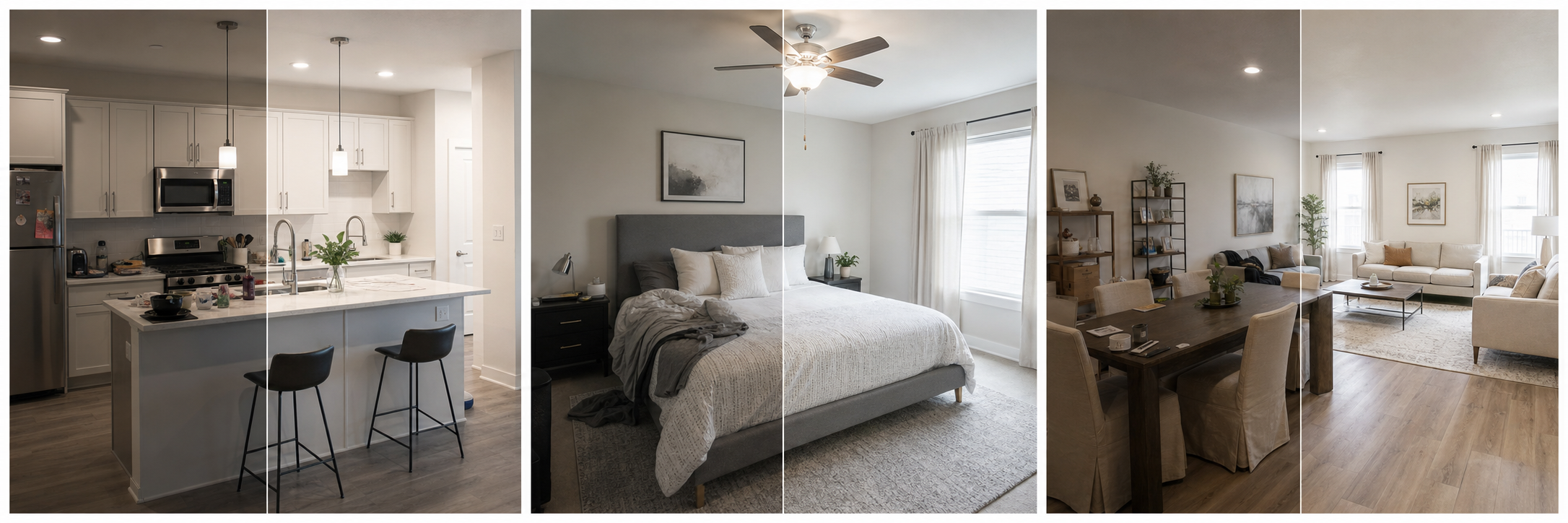
How often should you refresh listing photos?
Listing photos should stay current with the property, which matters more than any fixed schedule. A stale gallery can misrepresent the property even if every photo was accurate on the day it was taken. The practical rhythm for most hosts and landlords is an event-driven refresh plus a periodic audit: update immediately when something guest-facing changes, and review the whole gallery at least twice a year to catch drift you stopped noticing.
The test is simple. Walk the property with your listing open and compare each photo to the room in front of you. If a guest arriving today would notice a difference between the photo and reality, that photo is due for replacement, no matter how good it looks.
What events should trigger a photo refresh?
Some changes make an update obvious, like a kitchen renovation. Others creep in: furniture swapped one piece at a time, a hedge that grew over the view, a repainted exterior in a different color. All of them widen the gap between gallery and reality. Update photos after renovations, new furniture or bedding, landscaping changes, pool or amenity updates, exterior repainting, changed views, guest-facing repairs, and meaningful seasonal shifts. A useful habit is treating photo updates as the last step of any property change: when the work is done and the space is clean, shoot it before the first guest arrives, while it looks its documented best.
| Trigger | What to reshoot or update | Urgency |
|---|---|---|
| Renovation or repair | Every photo showing the changed space | Immediate |
| New furniture or bedding | Affected rooms, plus cover if featured | Immediate |
| Amenity added or removed | Amenity shots and listing details together | Immediate |
| Exterior paint or landscaping | Exterior, entry, and outdoor-space photos | Within weeks |
| Season change in a seasonal market | Exterior and outdoor amenity photos | Each booking season |
| Nothing obvious | Full gallery audit | Twice a year |
Why do outdated photos cost bookings and trust?
Photos are the promise; the stay is the delivery. Airbnb emphasizes photo accuracy because guests measure the property against the gallery at check-in, and a mismatch reads as deception even when it was only neglect. Outdated photos hurt in both directions. If the property has improved, old photos undersell it and leave money on the table. If it has worn or changed, old photos oversell it and generate the disappointed reviews that suppress future bookings far longer than the original shoot saved you time.
Long-term rentals face the same dynamic with higher stakes: a renter who tours a unit that does not match its Zillow photos rarely applies, and the wasted showing costs both sides.
How do seasonal changes affect your gallery?
Show guests the season they are booking. A gallery frozen in one season misleads in the others: lush summer landscaping promises greenery a January guest will not see, and a snowy cover photo makes a July listing feel off. In strongly seasonal markets, keep two versions of the exterior and outdoor amenity shots, one summer and one winter, and swap them as your booking window shifts. Interior photos usually survive seasons, though a fireplace shot works harder in winter and a patio shot in summer.
Ordering can do part of the work. Moving the hot tub forward for ski season and the pool forward for summer refreshes the listing's emphasis without changing a single photo. See our guide to rental property photo order for how to resequence quickly.
What should you refresh first when time is short?
Prioritize by visibility and by risk of mismatch. The cover photo and the first five images do most of the work on Airbnb, so they come first: they are what every searcher sees, and a dated cover ages the whole listing. Next, fix any photo that no longer matches reality, because those are the ones that create complaints and refund conversations rather than merely looking tired. Amenity photos that guests filter for come third, since a checked amenity box with a stale photo behind it invites doubt. Everything else, including minor detail shots and secondary angles, can wait for the next scheduled audit without hurting bookings in the meantime.
- Replace or update the cover photo if it shows the wrong season or old furnishings.
- Review the first five photos and swap any that no longer reflect the stay.
- Reshoot every room that physically changed since the last shoot.
- Update amenity photos guests filter for, especially pool, hot tub, and workspace.
- Swap exterior shots to match the current or upcoming booking season.
- Delete photos of anything removed, and update listing details to match.
- Do a final phone-size scroll to confirm the gallery still reads as one tour.
Can you refresh photos without a full reshoot?
Often, yes. A refresh has two separate jobs: replacing photos that are no longer accurate, and modernizing photos that are accurate but tired. Only the first job requires new photography. For the second, editing does the work: brighten a dim but truthful bedroom shot, correct a yellow color cast, crop a distracting edge, and sharpen soft focus so an older photo sits comfortably next to new ones.
Property Photo AI fits this workflow well. Touch-up mode improves lighting, color, and sharpness while preserving the real layout, fixtures, and views, and new-angle mode can generate additional listing-style views from your real reference photos when a room needs one more angle. Uploads are free and one credit equals one finished photo, so refreshing a handful of key images costs a few dollars rather than a photographer's session. Keep the boundary firm: editing refreshes accurate photos, and reshooting replaces inaccurate ones.
FAQ
When should listing photos be updated?
Update photos after renovations, new furniture or bedding, amenity additions or removals, exterior repainting, landscaping changes, changed views, and seasonal shifts that make the current gallery misleading. As a baseline, review the full gallery at least twice a year even if nothing obvious changed.
Do old photos hurt trust?
They can. Photos set the expectation guests measure the stay against, and Airbnb emphasizes that guests should get what the photos promise. If rooms, furnishings, amenities, or views have changed since the shoot, even excellent old photos become a source of complaints and disappointed reviews.
Do I need a full reshoot every season?
No. Most refreshes only touch a handful of images: the cover, the first five, exterior shots that show the wrong season, and any room that changed. Accurate photos of unchanged rooms can stay, often with light editing to keep the gallery consistent.
Should winter listings show snow photos?
Show the season guests will actually experience when they stay. A snow-covered exterior is an asset for a ski rental in January and a mismatch in July. If your market spans seasons, keep a summer and winter version of key exterior shots and swap them as bookings shift.
Is it okay to refresh photos with AI editing instead of reshooting?
Yes, when the underlying photo is still accurate. Brightening, color correction, cropping, and sharpening can make a truthful older photo feel current. AI editing cannot substitute for reshooting rooms that physically changed, because the photo must match what guests find.
How Property Photo AI helps
Property Photo AI helps landlords, Airbnb hosts, property managers, and real estate teams turn existing room photos into cleaner listing-ready images. It is built for realistic touch-ups: better light, color, crop, sharpness, and small-distraction cleanup without changing the actual room layout, fixtures, view, or condition.
Sources
- Airbnb Help Center: Taking great photos of your listing
- Airbnb Help Center: Setting up a photo tour for your home listing
- Airbnb Help Center: Add visual descriptions to photos in your listing
- Airbnb Help Center: Confirming photo accuracy for listings
- Airbnb Help Center: Offer for free Airbnb photography
- Google Business Profile
- Google Business Profile Help: Manage your hotel's details
- Booking.com Partner Hub: Understanding photo requirements for your property
- Booking.com Partner Hub: Improve visibility and ranking
- Vrbo Help: Photo guidelines
- Zillow Rental Manager Help: Photo Uploading Tips
- Zillow Rental Manager: Post a listing
- Zillow Rental Manager Help: Why is my primary photo different?
- Craigslist Help: Creating a posting
- Craigslist Help: Images
- Airbnb Help Center: Pricing your home listing
- Airbnb Help Center: Compare similar listings
- Airbnb Help Center: How search results work